
We redesigned how you configure inbound and outbound in Gail. One consistent experience replaces two separate diverging workflows, so you learn it once and use it everywhere. Here is what changed, why we made these choices, and how we think of new experiences to better serve you.
What Was Wrong With the Old Design?
Nothing... at first. When we built the original Receptionist and Outreach / Campaign experiences, they solved real problems very well. We got a lot of positive feedback from our users that our solutions were easier to understand than any of our competitors. The Receptionist Handbook let you set up an inbound script on a single page with a greeting, conversation actions, goodbye, routing rules. Outreach gave you a tabbed workspace to manage use cases, scripts, sequences, and redialing rules for outbound campaigns. Both worked very well initially. But as Gail grew, so did the features and we learned more about how you use Gail and what you need.
User experience is something that rarely can get close to 100% satisfaction. While that is frustrating to some engineers, we really love it and strive to make it better with each change. So we constantly view feedback and learn from how you use Gail, not just how we intend for Gail to be used.
Features that started as simple additions got bolted onto each experience separately. The Receptionist Handbook became a dense single page. Outreach tabs multiplied. Worse, the two experiences diverged in how they handled the same underlying concepts. You had to learn how scripts worked in one place, then re-learn a slightly different version in the other. That is not the experience we wanted to provide.
For our engineering team, this meant maintaining two parallel implementations of similar functionality. Bug fixes in one place did not automatically apply to the other. New features required double the integration work. The cost of that divergence compounds over time. So it was obvious that us engineers and our customers would be better served by a single experience.
How Does the New Experience Work?
We replaced Receptionist with Inbound and Outreach / Campaigns with Outbound. Both now follow a very similar step-by-step pattern.
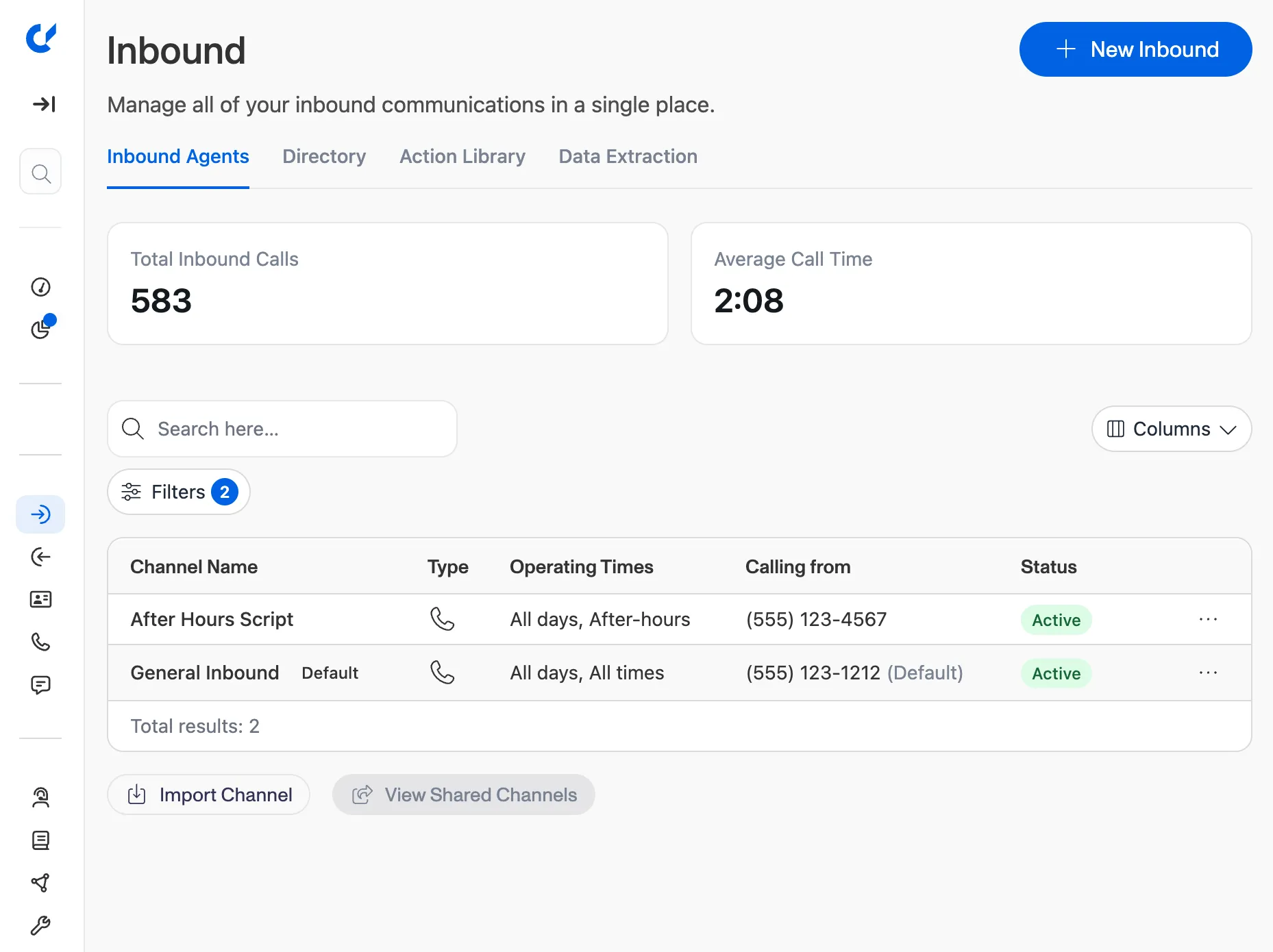
Inbound is organized around Channels. Each channel represents a phone number or entry point where Gail answers calls. When you configure a channel, you walk through a guided flow:
- Agent: choose or customize the AI agent for this channel, now including a better voice selection and testing capabilities
- Script: build your conversation script with actions
- Knowledge: connect your knowledge base so Gail can answer questions
- Hours: set business hours and after-hours behavior
- Test and Launch: test your setup with a live call before going live
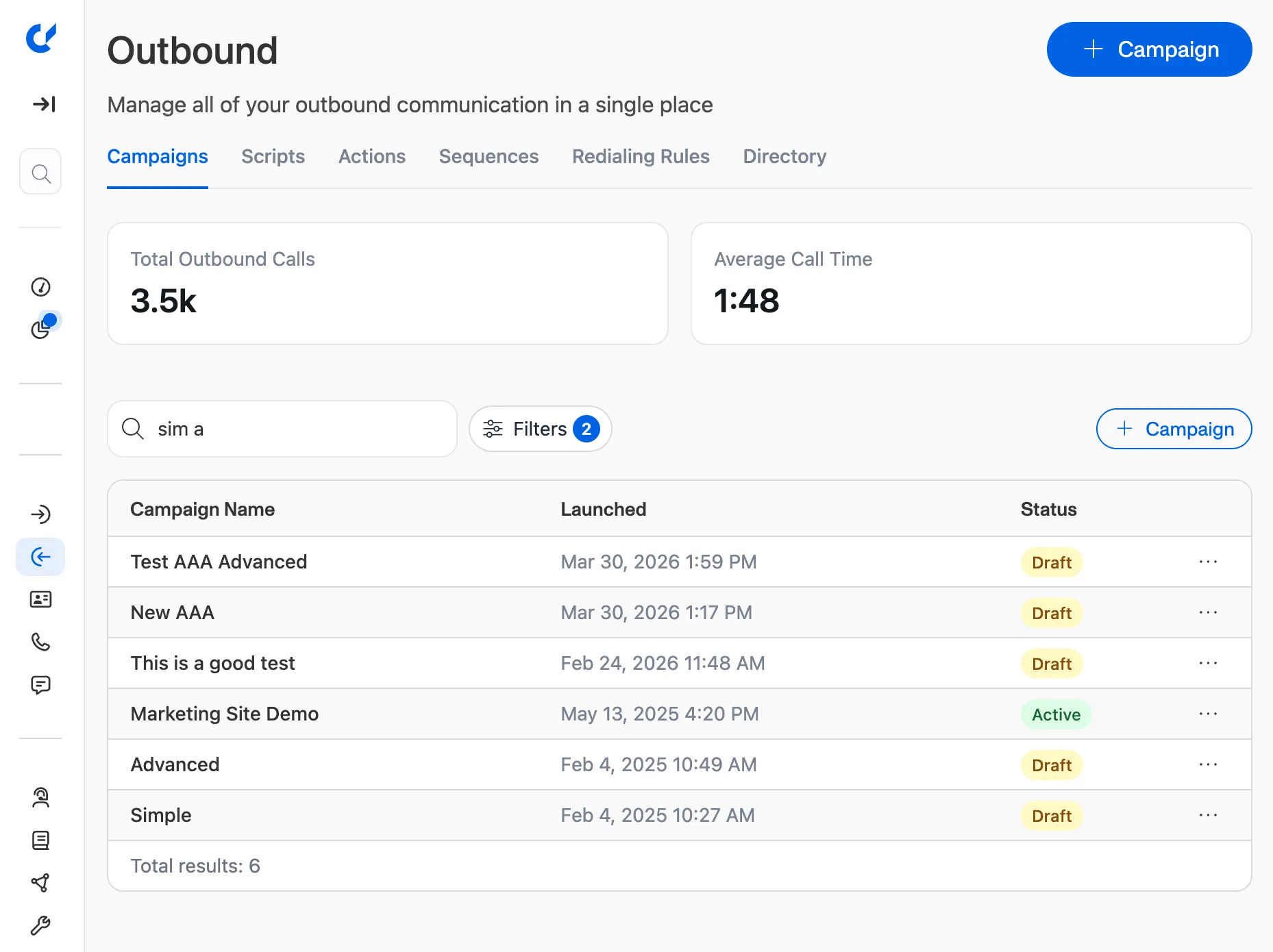
Outbound is organized around Campaigns. Each campaign is a coordinated outbound calling effort. The setup follows a similar guided flow but allows for basic or more advanced configurations.
Basic Campaigns New Experience
- Audience: select your contact list and assignments
- Script: build your single outbound script with actions
- Agent: choose or customize the AI agent
- Knowledge: connect your knowledge base so Gail can answer questions
- Test and Launch: verify everything before your campaign goes live
Advanced Campaigns New Experience
- Audience: select your contact list and assignments
- Sequence: define multi-step follow-up flows using existing scripts
- Redialing: configure retry rules for missed calls and voicemails
- Test and Launch: verify everything before your campaign goes live
The key difference from before: these flows share the same building blocks. The script editor, agent configuration, and knowledge base pages are the same components whether you are setting up an inbound channel or an outbound campaign. Learn it once, use it everywhere.
Why Did We Rename Use Cases to Actions?
This was a deliberate choice. "Use cases" is a term that makes sense internally — it describes a category of interaction Gail can handle. But when we watched customers configure their scripts, we noticed confusion. "What is a use case?" was a common question during onboarding.
Actions answers that question immediately. An action is something Gail does during a conversation. Gail can book an appointment, transfer to an agent, send a follow-up text. The name tells you what to expect.
The underlying system has not changed. Actions are the same powerful building blocks: each one has triggers, responses, and optional SMS follow-ups. You can still create them, reorder them within a script, and reuse them across multiple scripts. We just gave them a name that matches what they actually are.
Your existing use cases have been automatically carried over as Actions. Nothing was lost in the transition — same configuration, clearer name.
What Are the Enhanced Voice Features?
Alongside the structural redesign, we are shipping voice improvements that affect both inbound and outbound:
- Expanded voice library: more voices to choose from, searchable by accent, language, and style
- Voice preview in setup: hear how your agent sounds before going live, directly in the channel or campaign wizard
- More coming soon: adjust speed, tone, and delivery to match your needs
These updates work within the same guided setup flows. When you reach the Agent step in either an inbound channel or outbound campaign, you will see the new voice options right there.
You will now be able to select a voice and then test that voice before you save the channel or campaign. You can type in any text and hear how it sounds with the selected voice. We also save this text so you can try other voices with the same phrase to compare and find the perfect voice for your brand.
What Does This Mean for Existing Configurations?
These changes are backwards compatible with your existing configurations! We will be automatically updating existing users to the new experience shortly after this update is released. We plan on doing that over the next few weeks, so keep your eyes peeled.
Gail is now more powerful and easier to use than ever before, almost every section has an option to "Have Gail Help". Gail has been learning and is now better than ever at helping you. We have set up complex campaigns all with Gail's help and we think you will be impressed with how well it works. We look forward to having Gail learn even more over the next weeks and months.
The Bottom Line
These changes reflect a principle we keep coming back to: as a platform grows, complexity should not grow with it, in fact it should shrink if we do our job right. The old Receptionist and Outreach experiences served us well, but they were diverging in ways that made both harder to use and harder to improve. By unifying around Inbound and Outbound with shared building blocks, renaming Use Cases to the more intuitive Actions, and enhancing voice capabilities across the board, we are making Gail simpler to configure without sacrificing any of the power you rely on.
If you have any questions or feedback, please feel free to reach out to us at support@meetgail.com. We would love to hear from you and improve Gail even more.
Published
About Gail
Founded in 2024 by Michael and Matthew Vega-Sanz, Gail provides specialized AI solutions designed exclusively for the financial services sector. Headquartered in Miami, Florida, Gail also maintains offices in San Francisco.
Follow Gail on LinkedIn